#90daysofdevops { Day -2}

🤔What is Linux?
Linux is an operating system that is both versatile and powerful. It is free and open-source software that is based on the Unix operating system and was created by Linus Torvalds in 1991. The stability, scalability, and cost-effectiveness of Linux make it a popular choice for various applications and industries.
🌟Why is Linux so popular over another operating system?
Free and Open-Source: 🔄 Linux's popularity arises from its open-source nature, allowing users to access, modify, and distribute the source code freely.
Secure: 🔒 Security is a hallmark of Linux. Its strong permission system, regular updates, and dedicated community contribute to a secure computing environment, making it a preferred choice for many.
Fast: ⚡ Linux is well-known for its efficiency and speed. Its lightweight design and optimized kernel contribute to swift performance, making it an ideal choice for various computing tasks.
Many Distributions: 🌐There are tons of Linux distributions available such as Ubuntu, CentOS, Red Hat, Debian, and Fedora, which make Linux a popular operating system.
🏰What is the Architecture of Linux?
The architecture of Linux is the underlying structured layer like other operating systems. Generally, it has four fundamental layers. Those are: application, shell, kernel, and hardware. It is very important to understand for both the developers and users how each layer is connected and creates the whole system. Below the image, you can see the links between each layer.
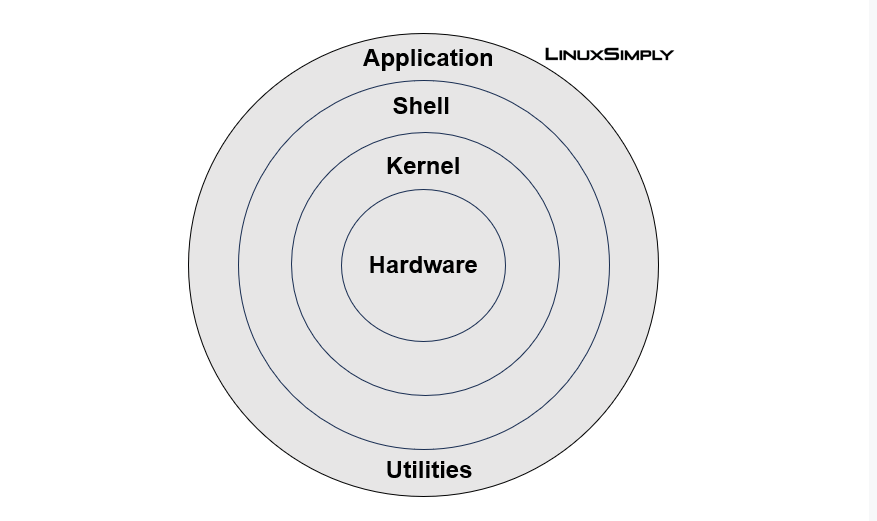
Kernel - The Brain 🧠: Kernel is the heart of the Linux operating system, which is responsible for device management, memory management, process management, and handling system calls. also, it is something that acts as a bridge or mode of communication between the software and hardware.
Shell - Your Friendly Translator 💻: The shell acts as the interface between users and the kernel. Think of it as a translator, taking your commands and instructing the kernel on what to do. Bash is one of the popular shells, and provides a command-line environment.
Applications - The User Interface 👀**:** Applications and utilities form the user interface, allowing users to interact with the system effortlessly. From text editors to web browsers, these applications leverage the power of the kernel and the shell to perform tasks and improve the overall user experience.
🛠️Some Basic Linux Commands:
🏠 Navigation:
pwd: Print Working Directoryls: List files and directoriescd: Change Directorymkdir: Make Directoryrmdir: Remove Directory
📄 File Operations:
touch: Create an empty filecp: Copy files or directoriesmv: Move or rename files or directoriesrm: Remove files or directoriescat: Display content of a file
🖥️ System Information:
uname: Display system informationwhoami: Display current usernametop: Display and manage system processes
🖱️ Text Editing:
nano: A simple text editorvimorvi: Powerful text editor (may have a learning curve)
🕵️ Search and Find:
grep: Search for a pattern in filesfind: Search for files and directories
📂 Archive and Compression:
tar: Create or extract tar archiveszipandunzip: Compress and decompress files in ZIP format
🚀 System Control:
ps: Display information about active processeskill: Terminate a processshutdownandreboot: Shutdown or restart the system
📊 Disk and Space Usage:
df: Display disk space usagedu: Display directory space usage
📡 Network Commands:
ifconfigorip: Display network configurationping: Test network connectivitynetstat: Display network statistics
🌐 Package Management:
aptoryum: Package management tools for installing, updating, and removing software packages
In the tech realm, Linux is like the Swiss Army knife of operating systems. 🐧 From an interview standpoint, it's a hot topic because it demonstrates a knack for open-source tech, something many companies adore. 💻 Think of Linux as your digital bouncer - it's got rock-solid security features that employers drool over in interviews. 🔒 Plus, it's the cool cat in server-land, running the show for many big players. 🚀 If you're a fan of command-line magic, Linux is your stage; interviewers dig candidates who can dance in the terminal. 🎩✨ It's not just a techie preference - Linux is the backbone of containerization and DevOps, making it a must-know for anyone looking to ride the modern software wave. 🌊 And let's not forget, it won't burn a hole in your pocket - it's open source and free. 🆓 So, whether you're chatting in an interview room or just trying to be the boss of your computer, Linux is your go-to buddy. 🤘🏼🚀
Give this blog a thumbs up! 🌟 Your support fuels my passion for creating informative and engaging content. Together, let's explore, learn, and grow! 🚀💻
Connect with me on LinkedIn👔🌐:https://www.linkedin.com/in/nikhil-kathale-27544a1b5/